
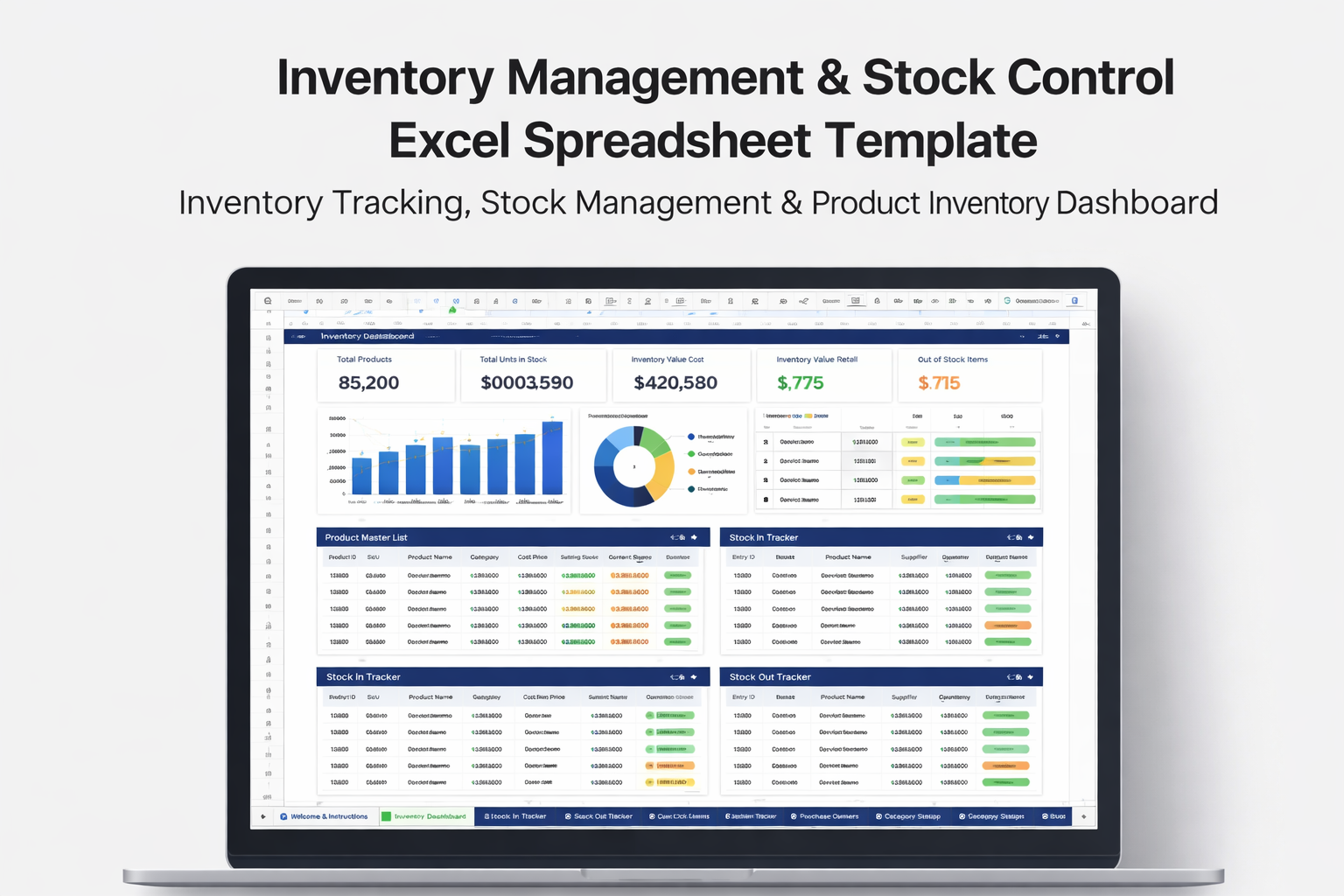
Inventory Management & Stock Control Excel Spreadsheet
Inventory Management & Stock Control Excel Spreadsheet Template – Inventory Tracking, Stock Management & Product Inventory Dashboard
$29.00$17.00
The Inventory Management & Stock Control Excel Spreadsheet is a powerful and easy-to-use inventory tracking system designed to help businesses manage their products, monitor stock levels, track inventory movement, and maintain complete control over their inventory operations.
Managing inventory manually can quickly become difficult as businesses grow and product catalogs expand. Without an organized inventory system, businesses risk losing track of stock quantities, running out of popular products, overstocking items, or making costly purchasing mistakes.
This inventory spreadsheet provides a structured solution that allows businesses to manage their entire inventory process in one organized workbook.
With built-in dashboards, automated calculations, and structured tracking systems, users can easily monitor stock levels, track incoming and outgoing inventory, identify low stock products, and calculate the total value of their inventory.
The spreadsheet functions as a complete inventory management system built inside Microsoft Excel or Google Sheets, making it an ideal solution for businesses that need a professional inventory tracking tool without investing in expensive inventory software.
This spreadsheet is designed to be simple enough for beginners while still powerful enough for growing businesses that need reliable inventory tracking tools.
What Is an Inventory Management Spreadsheet?
An inventory management spreadsheet is a structured digital tool used to track and organize products, monitor stock quantities, and manage inventory movement within a business.
Businesses use inventory spreadsheets to maintain accurate records of their products, track stock levels, monitor inventory purchases, and analyze inventory value.
Unlike complicated inventory software systems, an inventory spreadsheet allows businesses to maintain full control over their product data while keeping inventory records simple, organized, and easy to update.
Inventory spreadsheets are widely used by small businesses because they provide a flexible and affordable way to manage stock without the need for expensive software subscriptions.
With the right structure, an inventory spreadsheet can act as a complete inventory control system, helping businesses track inventory activity and make better purchasing and restocking decisions.
What This Inventory Spreadsheet Helps You Do
This inventory management spreadsheet helps businesses organize and track inventory operations more efficiently.
Using this spreadsheet, users can:
• Track all products in one organized inventory list
• Monitor current stock levels for every product
• Record inventory coming into stock
• Track products leaving inventory through sales or usage
• Identify low stock products that need restocking
• Monitor reorder levels to prevent stock shortages
• Track supplier information for each product
• Monitor purchase orders and restocking activity
• Calculate the total value of inventory in stock
• Analyze inventory movement each month
• Maintain accurate records of product quantities and stock changes
This system helps businesses stay organized and maintain accurate inventory records while avoiding stock shortages and overstocking issues.
Key Features
The inventory spreadsheet includes several features designed to help businesses manage their inventory efficiently.
Key features include:
• Complete product inventory database
• Inventory dashboard with visual metrics
• Stock in and stock out tracking system
• Low stock alert system
• Supplier management tracker
• Purchase order tracking system
• Inventory valuation calculations
• Monthly inventory movement reports
• Automated stock level calculations
• Conditional formatting for stock alerts
• Easy customization of categories and suppliers
These features allow businesses to maintain complete visibility over their inventory operations.
Spreadsheet Tabs Included
This inventory spreadsheet workbook includes several organized tabs designed to manage different parts of inventory operations.
Welcome & Instructions
Step-by-step instructions explaining how to set up and use the inventory spreadsheet.
Inventory Dashboard
A visual dashboard that displays key inventory metrics including stock levels, inventory value, low stock alerts, and inventory activity.
Product Master List
A centralized database that stores all product details including product names, categories, suppliers, prices, and reorder levels.
Stock In Tracker
A system used to record inventory received from suppliers or restocking activities.
Stock Out Tracker
Tracks inventory removed from stock through sales, damage, returns, or internal usage.
Current Inventory Levels
Displays real-time inventory quantities for every product in the system.
Low Stock Alerts
Automatically identifies products that are below reorder levels and need restocking.
Supplier Tracker
Stores supplier contact information and product supply relationships.
Purchase Order Tracker
Tracks inventory purchase orders and supplier deliveries.
Inventory Valuation Summary
Calculates the total value of inventory based on product cost and selling price.
Monthly Inventory Summary
Analyzes inventory movement and changes month by month.
Category Setup
Allows users to customize product categories, supplier lists, and inventory statuses.
Notes & Best Practices
Helpful guidance on managing inventory efficiently and maintaining accurate records.
Who This Inventory Spreadsheet Is For
This spreadsheet is ideal for businesses and professionals who need a simple but powerful inventory tracking solution.
Perfect for:
• Retail store owners
• E-commerce businesses
• Amazon sellers
• Shopify store owners
• Boutique owners
• wholesalers
• warehouse managers
• product-based small businesses
• entrepreneurs selling physical products
Any business that manages product inventory can benefit from using this spreadsheet.
Benefits of Using This Inventory Spreadsheet
Using a structured inventory management spreadsheet provides several important advantages for businesses.
Benefits include:
• Maintain accurate stock records
• Prevent running out of important products
• Avoid over-ordering inventory
• Track product movement clearly
• Monitor inventory value and product costs
• Improve purchasing decisions
• Keep supplier information organized
• Save time compared to manual inventory tracking
This spreadsheet helps businesses maintain a professional and organized inventory management system.
File Format
This digital product includes:
Excel Spreadsheet (.xlsx)
Compatible with:
• Microsoft Excel
• Google Sheets
No additional software or subscriptions are required.